viaNexus runs a hosted MCP server at https://vast.blueskyapi.com/vianexus/mcp. Point any MCP client at it, sign in once, and your agent can search and pull institutional financial data: real-time and historical prices, fundamentals, earnings calendars and transcripts, news, corporate actions, estimates and macro data. One endpoint covers every dataset your subscription includes.
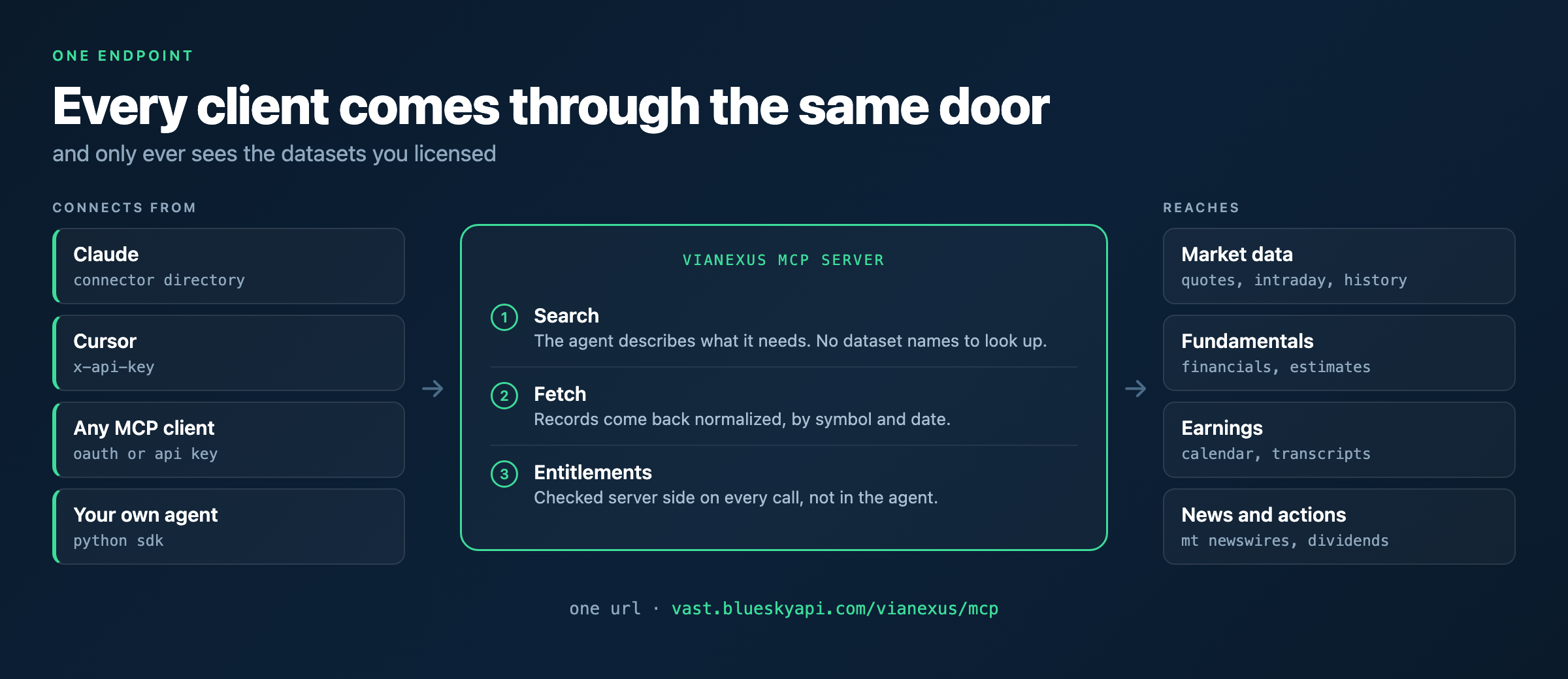
https://vast.blueskyapi.com/vianexus/mcp. Sign in from Claude's directory, drop a key into Cursor, or point your own agent at it. The server handles discovery, fetching and permissions, so the agent never touches a dataset you have not licensed.What is an MCP server for financial data?
MCP, the Model Context Protocol, is how an AI assistant talks to an outside system. Instead of pasting numbers into a chat or writing glue code for each vendor, the assistant connects to a server that exposes tools it can call on its own.
A financial data MCP server does that for market data. The agent asks for what it needs, the server returns clean, normalized records with the entitlements already applied. No scraping, no CSV exports, no separate integration for every provider.
What data can an agent reach?
Everything in your subscription, across both viaNexus workspaces:
- Market data: real-time and delayed quotes, intraday prices, historical prices, indices
- Fundamentals: reported financials, normalized fundamentals, company stats
- Events: earnings calendar with confirmed and predicted dates, events calendar, earnings call transcripts both historical and real-time
- News: MT Newswires global and North American coverage
- Corporate actions: dividends, splits, spinoffs, rights, distributions and more
- Estimates and analytics: EPS and revenue forecasts, pre-trade analytics
- Macro and risk: country macro forecasts and operational risk scores
- Reference: exchanges, trading calendars, company descriptions and logos
The full list lives in the dataset catalog.
How do I connect Claude to viaNexus?
Add viaNexus from the Claude connector directory, hit Connect, and sign in. There is nothing to paste and no config file to edit.
Open the viaNexus connector in the Claude directory
How do I connect Cursor?
Cursor authenticates with an API key rather than OAuth. Install from the Cursor directory, or generate a key in the viaNexus console and add it yourself:
{
  "mcpServers": {
    "vianexus": {
      "url": "https://vast.blueskyapi.com/vianexus/mcp",
      "headers": { "x-api-key": "sk_your_key_here" }
    }
  }
}
Put that in ~/.cursor/mcp.json for every project, or .cursor/mcp.json inside one.
What about other MCP clients?
Anything that speaks MCP works. Point it at https://vast.blueskyapi.com/vianexus/mcp and authenticate with OAuth through the client's connector config, or send your viaNexus key as an x-api-key header. MCP support for the OpenAI platform is in active development.
What tools does the server expose?
- search finds the right dataset for a question, so the agent does not need to know dataset names in advance
- fetch pulls records from a dataset by symbol and date
- symbol universe tools let an agent keep a working list of symbols across a conversation
- rules tools create and manage alert conditions that fire without an agent in the loop
How is access controlled?
Entitlements are enforced server side. The agent only ever sees datasets your account is licensed for, so a prompt cannot talk its way into data you have not bought. That matters when a model is calling tools on its own. We wrote about the design in MCP Permissions for Financial Data.
What does it cost?
Every plan includes the MCP server, and the trial is 14 days with no credit card. Dataset pricing is listed in the catalog and pricing page.
Where to go next
- MCP setup, client by client
- Python Agent SDK, for building agents in code rather than a chat client
- Build a live market dashboard in 15 minutes
- Dataset catalog
Related guides
- Connect Claude to Live Stock Market Data — Add the viaNexus connector in Claude and start pulling quotes, earnings and news.
- Cursor MCP Setup for Financial Data — API key config, environment variables and common Cursor gotchas.
- MCP OAuth and Software Statements — How the OAuth flow works, what software statements control and how entitlements are enforced.